DELIVERY TOOL REDESIGN
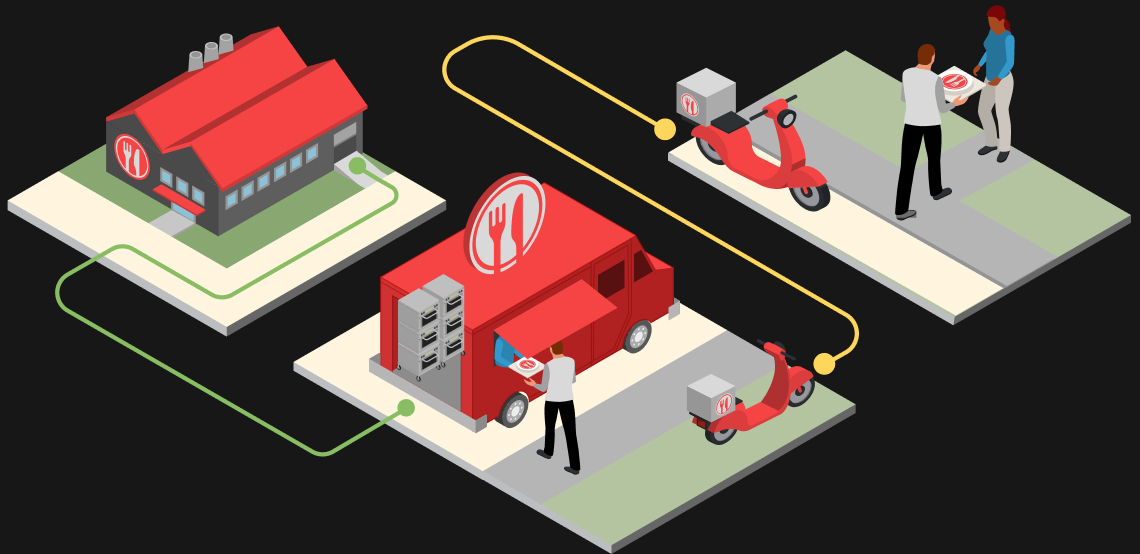
Zume Pizza’s delivery drivers (known as Pielots) used the last-mile delivery tool to deliver freshly baked pizzas from Zume’s food trucks. The tool needed to be redesigned for drivers’ own devices and to anticipate Zume’s need for a white-label software product.
The app was originally designed only for company-owned iPads. As the business and fleet started to grow outside of the original Mountain View service area, buying iPads to keep up was no longer financially feasible.
At the same time, Zume was anticipating new restaurant partners who would need a last-mile delivery app for their own fleets.
We redesigned the tool to work on drivers’ own devices and be flexible enough for future Zume partners.
MY ROLE
Product designer
TEAM
2 product designers, product manager, engineering pod
TIME
2.5 months
TOOLS
Figma, Flinto, GSuite
MAIN WORKFLOW
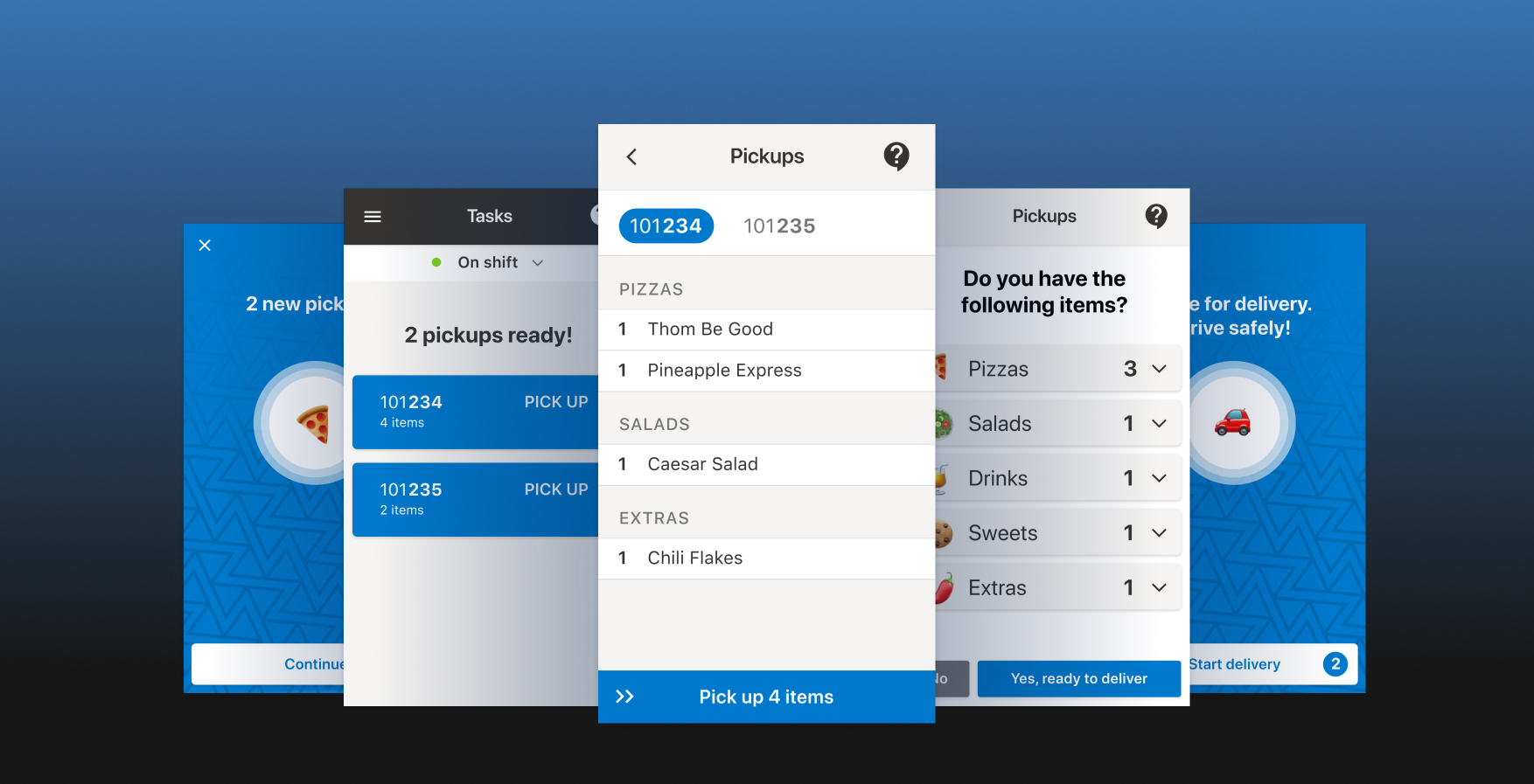
The video above demonstrates the main workflow that Pielots would go through to pick up and deliver orders.
KICKOFF
Goals to meet in 2.5 months
Goals to meet in 2.5 months
Zume Pizza was planning to expand its markets soon and wanted to move Pielots onto the new app by the expansion. These factors gave an initially short timeline of 2.5 months to get the app designed and partially developed.
Working with our product manager, we outlined the top goals of the project that needed to be met:
Translate the existing tool without compromising delivery. The format change needed to at least preserve the delivery experience for both drivers and customers, and ideally improve it.
Design for safety and accessibility. Drivers encounter potential danger throughout the course of any delivery. We had a chance to re-examine the safety and accessibility of this tool.
Design flexibly for white-labeling and process variation. Since the same tool would be used by Zume’s partners with their own food businesses, we needed to design in a way that would lend itself to replication and editing.
Zume Pizza was planning to expand its markets soon and wanted to move Pielots onto the new app by the expansion. These factors gave an initially short timeline of 2.5 months to get the app designed and partially developed.
Working with our product manager, we outlined the top goals of the project that needed to be met:
Translate the existing tool without compromising delivery. The format change needed to at least preserve the delivery experience for both drivers and customers, and ideally improve it.
Design for safety and accessibility. Drivers encounter potential danger throughout the course of any delivery. We had a chance to re-examine the safety and accessibility of this tool.
Design flexibly for white-labeling and process variation. Since the same tool would be used by Zume's partners with their own food businesses, we needed to design in a way that would lend itself to replication and editing.
BEFORE AND AFTER
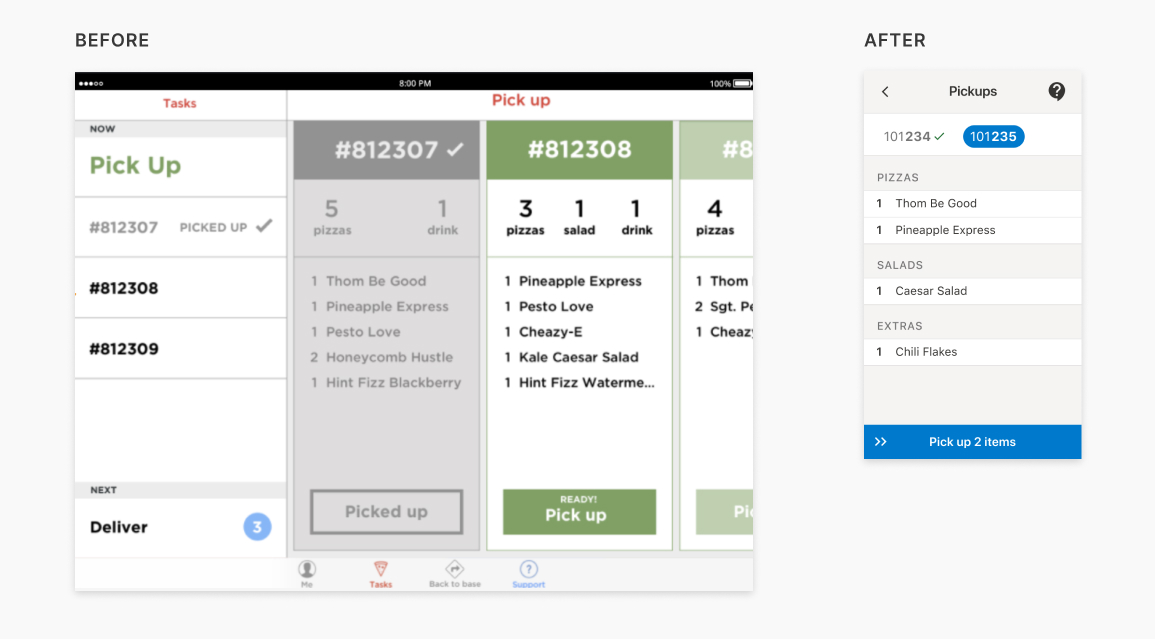
A comparison of similar workflow states on the previous iPad version to the finished version. Moving to a tool that drivers could use on their own phones meant further prioritizing how information was displayed on each screen.
My role
I was part of a small team for this project. Highlights that I worked on include:
- Initial research and competitive analysis
- Early sketching and iteration
- Primitives for accessibility
- Rapid testing & prototyping
- Test results analysis & research documentation
- Alert visual design
I partnered with a product designer, and we worked together to split up work and responsibilities throughout the process. Additionally, we worked with a product manager and Zume’s iOS & Android engineering teams.
Zume’s prediction: In-house delivery fleets produce better results
Zume believed there would be demand for in-house last-mile delivery over out-sourcing to partner services like Doordash, UberEats, and Caviar. Fleets trained in food handling can deliver better food quality, and hospitality training can help overcome food handling issues.
Being part of a restaurant’s fleet instead of delivering through last-mile services also has benefits for drivers. In the case of Zume Pizza, Pielots were treated as employees (rather than independant contractors) who were paid an hourly rate and recieved additional employee benefits. Quite a few Pielots went on to transition from delivery to other parts of the company like operations. Their fleet experience gave them insights into improving processes while also having a Pielot’s perspective in mind.
For these reasons, we were designing for in-house fleets similar to what Zume Pizza was currently using. We used the current Pielot’s job as a model for this tool’s redesign since it would be extremely similar to the operational structure for Zume partners.
PICKING UP ORDERS FROM ZUME’S TRUCKS
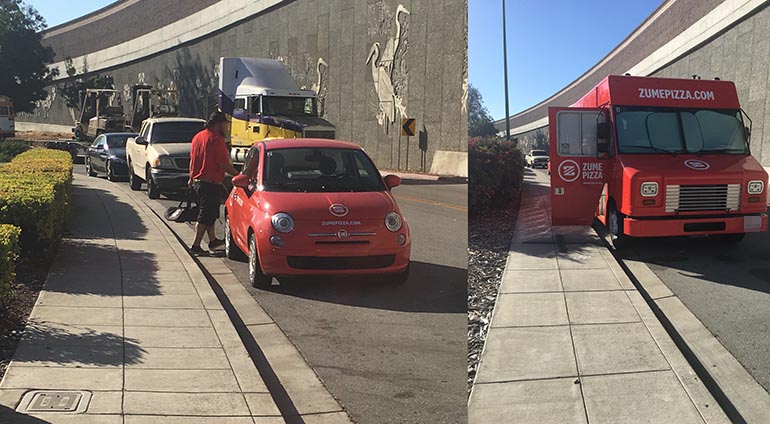
The last-mile delivery app notified Pielots when pizzas were finished cooking and ready for pick-up from the truck. These photos were taken during one of our shadowing sessions.
RESEARCH
What’s it like to be a Pielot?
We had a general sense of how Pielots did their job and how the delivery tool guided them but had a lot of questions and assumptions about the process. Moving to smaller phone screens meant prioritizing action even further than in the iPad app, and our understanding of the process would directly affect how we displayed information at any point. Our decisions would affect the daily work of Pielots, the customer ordering pizza, and future Zume partners.
We needed to understand the finer details of the workflows, challenges, and responsibilities Pielots faced at work. We conducted informal interviews with Captains (expeditors working on trucks) and Pielots (last-mile drivers) throughout the project and spent time with Pielots and Captains on shift. We also familiarized ourselves with the current workflows through training materials.
We needed to understand the finer details of the workflows, challenges, & responsibilities Pielots faced at work.
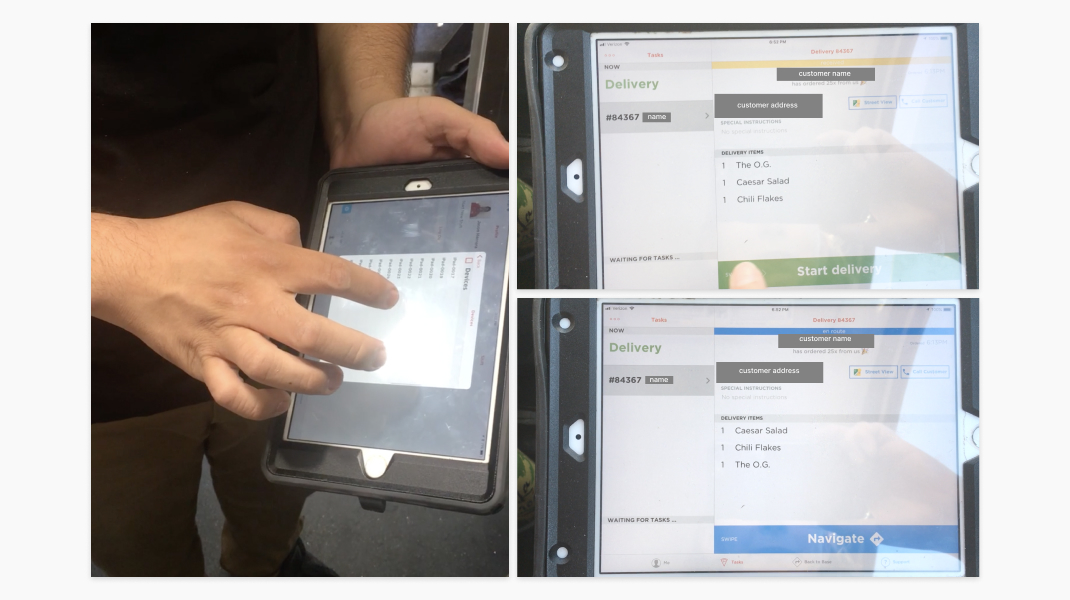
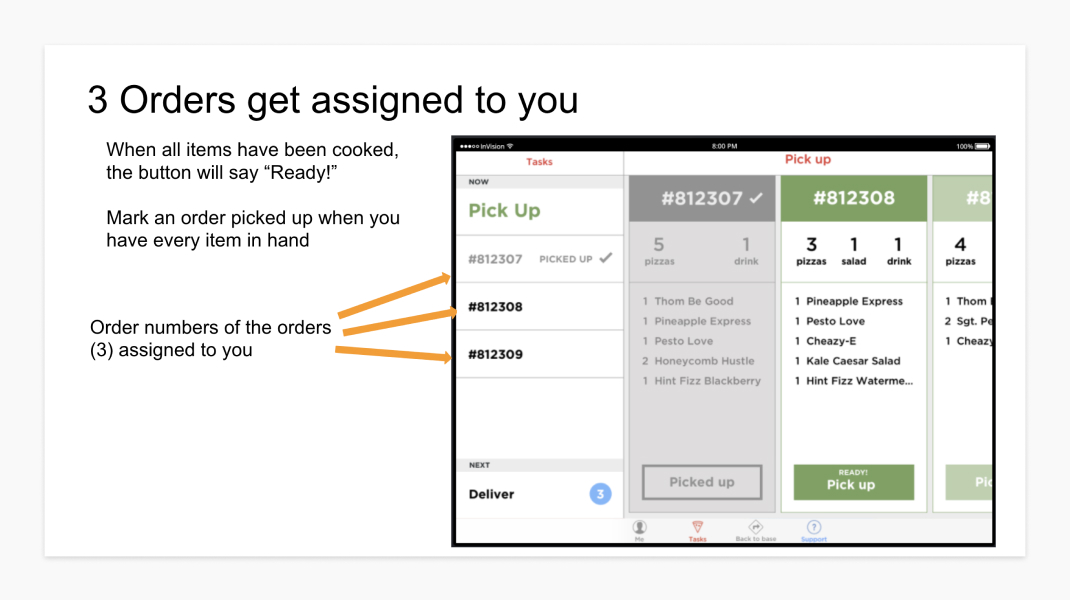
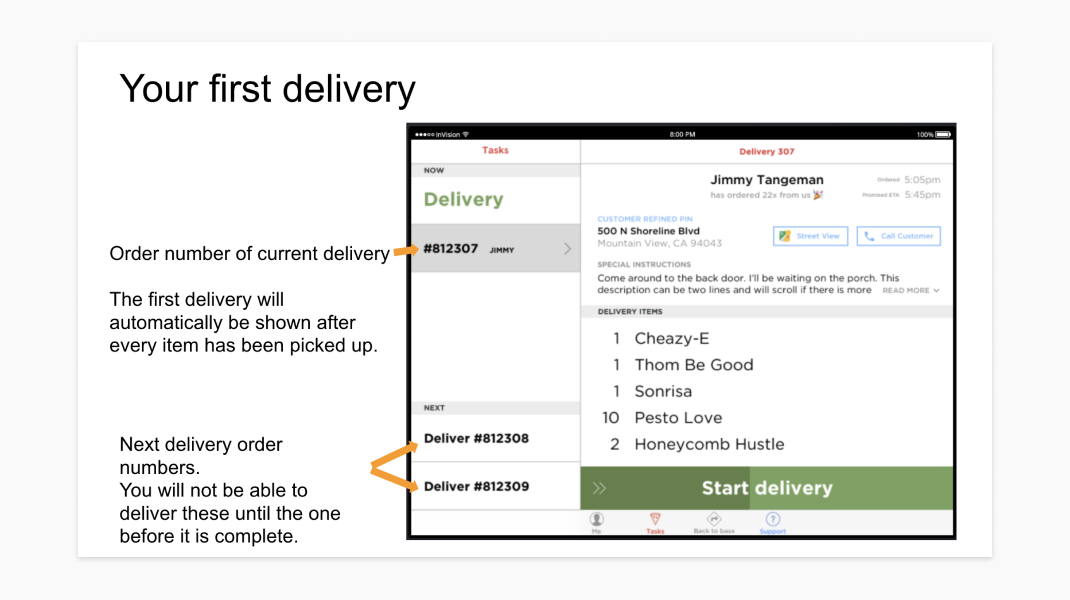
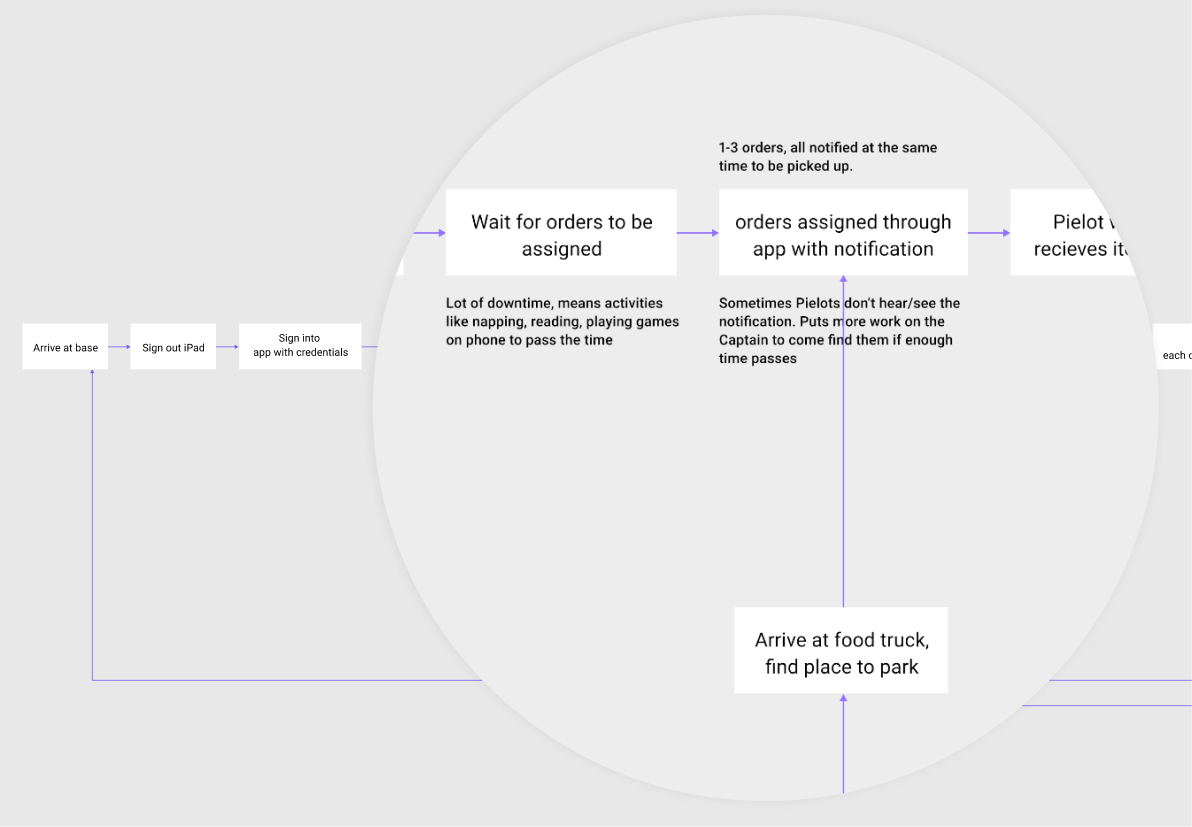
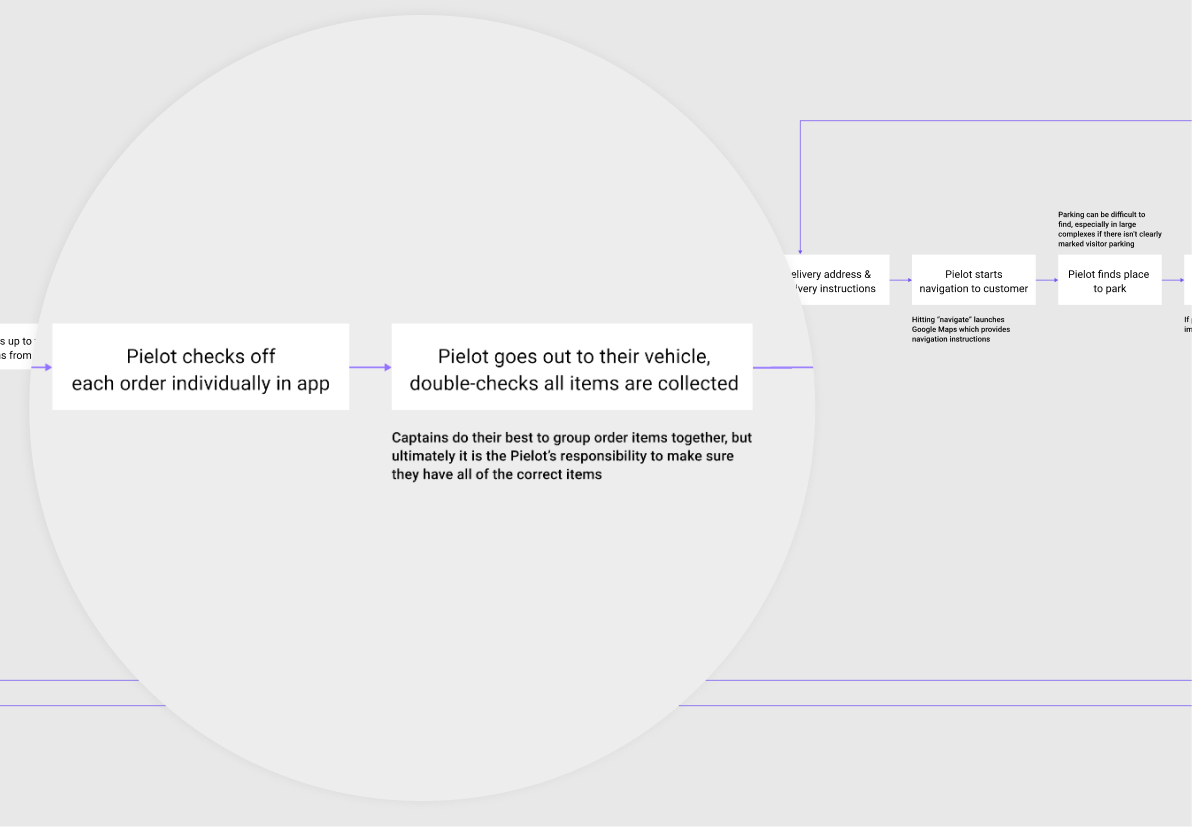
RESEARCH ARTIFACTS & HIGHLIGHTS
I tested the Pielot app for myself during a ride-along. We looked through current training materials to understand how Pielots are trained to use the current app while they deliver orders, and used what we learned to create a journey map.
Principles for safety and accessibility
We wanted to make sure the app didn’t interfere with driving and maximized accessibility. We gathered the conditions that a Pielot would experience during a shift (e.g. direct sunlight, in a car and while driving, busy conditions where information needs to be quickly referenced) and wrote up the associated design implications. We also looked at how other companies were designing for accessibility and driving conditions (Android Auto Design Guidelines, Waze, Google Maps).
We gathered the conditions that a Pielot would experience during a shift and wrote up the associated design implications.
These principles were documented to guide the app’s design system. The documentation also provided us with evidence to show stakeholders if questions came up regarding our design choices, especially in light of Zume Pizza’s recent re-branding.
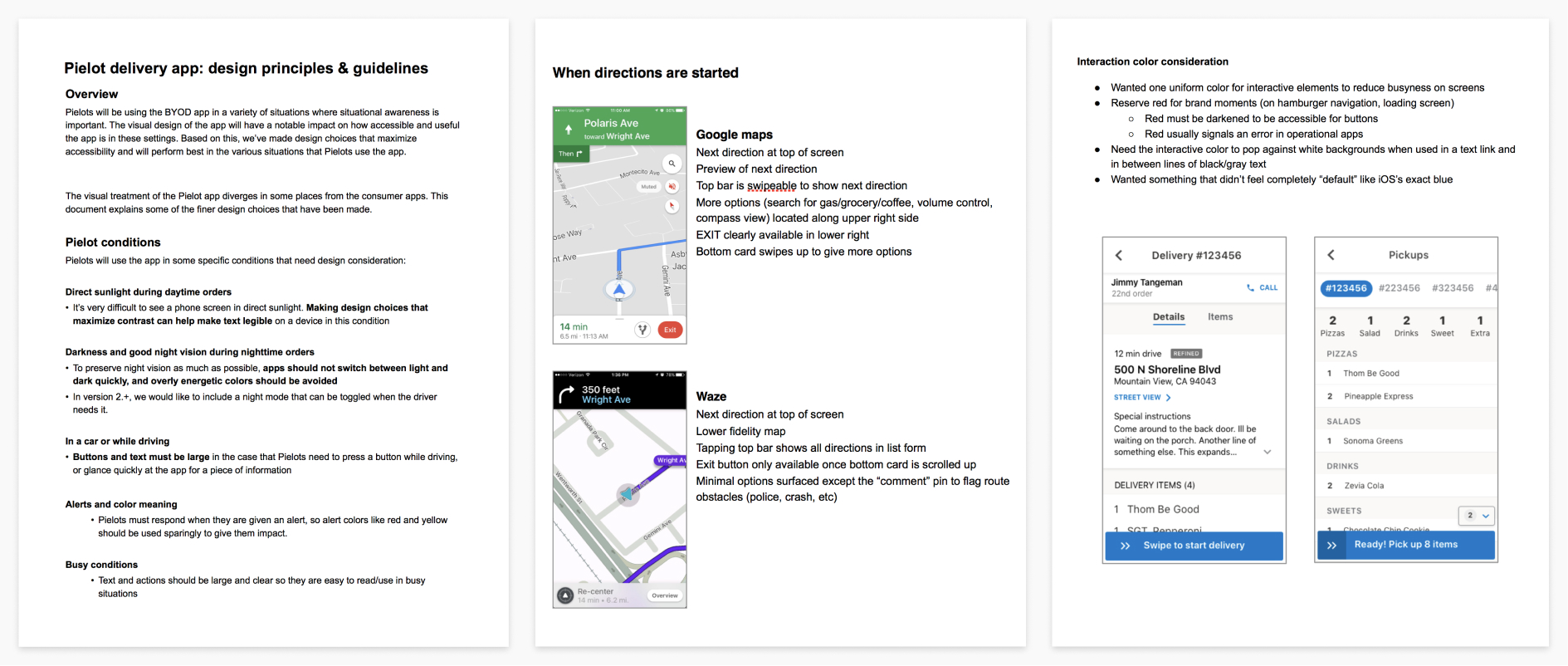
DOCUMENTATION ON SAFETY & ACCESSIBILITY
My teammate and I gathered the situations and considerations needed in the context of a Pielot's work. We used WebAIM and Google's color tool to check the accessibility of our color and type choices.
INITIAL IDEATION
How are others solving a similar problem?
Our PM and I conducted a competitive analysis of existing last-mile delivery apps (e.g. Doordash, Caviar, UberEats) to understand how they organized information and how they might inform the problems we were trying to solve.
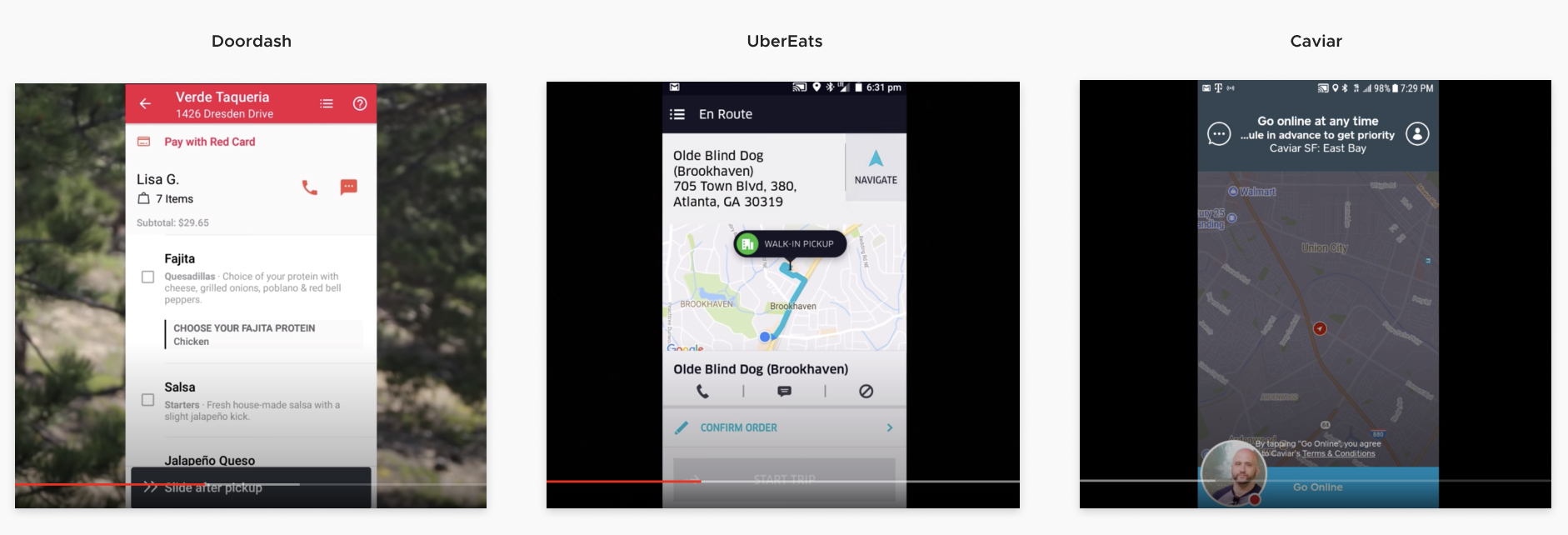
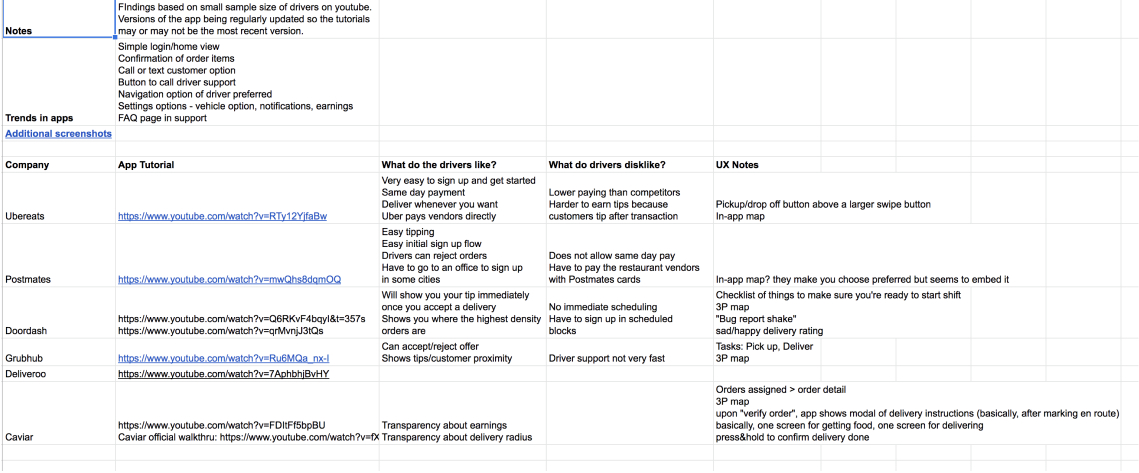
COMPETITIVE ANALYSIS
Documentation we created as we looked through different last-mile delivery apps. Since all of these apps require you to be a verified driver vetted with their service, we turned to YouTube where we found drivers giving walkthroughs and tutorials of the apps.
Sketching through flows and organization, informed by the current Pielot journey
My teammates and I went through some individual sketching on the main flows and reviewed the ideas and questions we had together. Once we discussed what we thought was a good first pass based on the research we gathered, we split up the flows and screens between ourselves to create a prototype for testing.
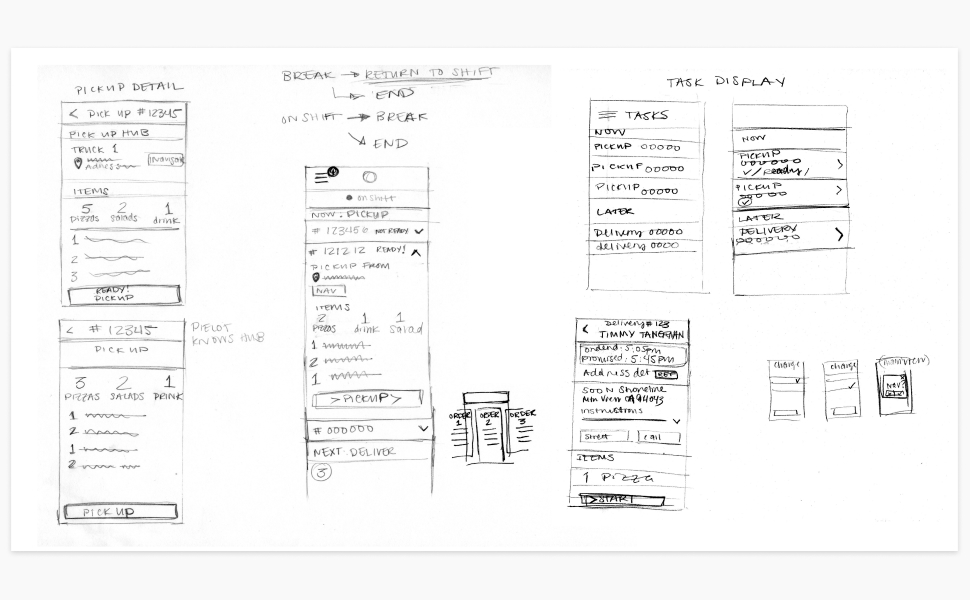
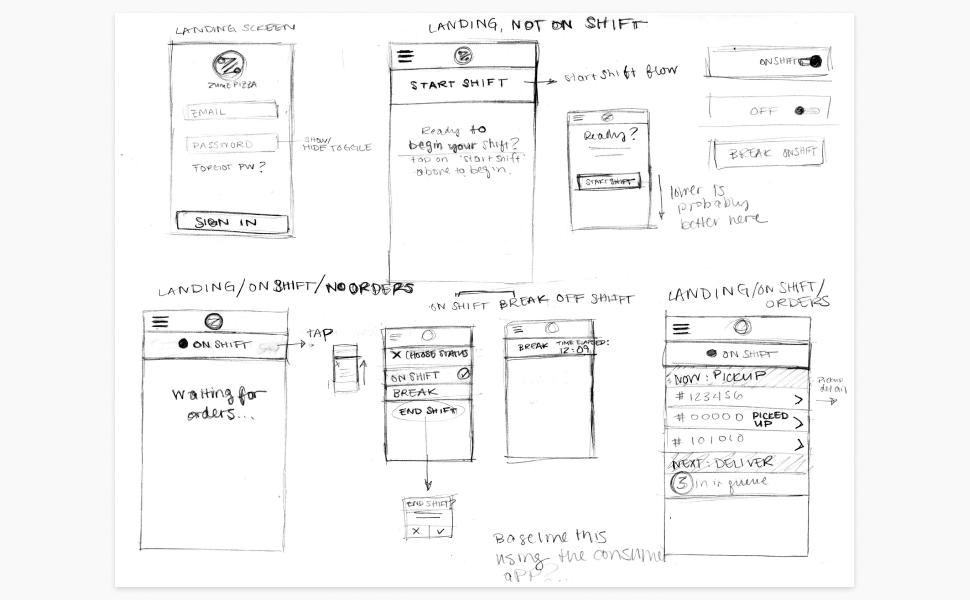
EARLY SKETCHES
Some of my early sketches on the workflows and interactions in the app. I was thinking about what information was most important to drivers at any point in the process, and how we might be able to keep the design familiar to what Pielots were already comfortable using.
TESTING & ITERATION CYCLES
Writing up results and analysis for our team to reference
I wrote up summaries of our results along with recommendations so the whole team could see what went well and where we could improve. Since our timeline was fairly short, we concentrated on making quick prototypes with Figma that we could put in front of Zume Pizza Pielots often.
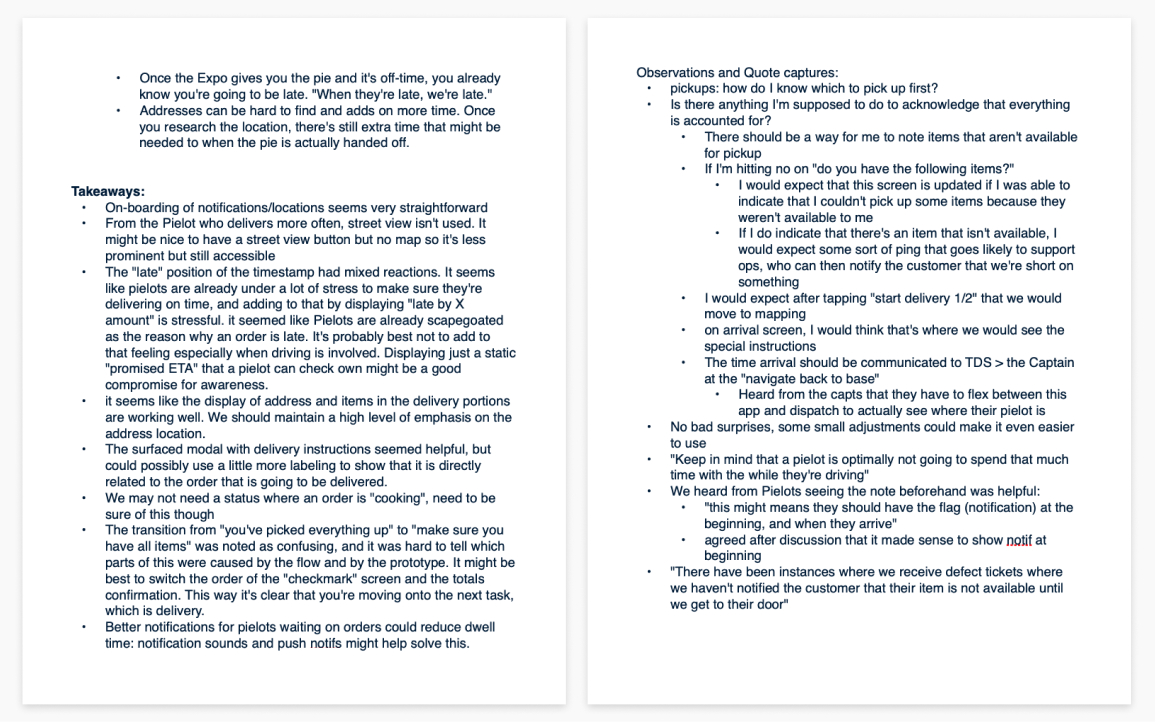
TESTING SUMMARIES
Some takeaways, quotes, and observations that I summarized for our team from testing. This kept all of our team members on the same page especially when someone couldn't attend a session, and helped streamline where we should direct our focus during iterations.
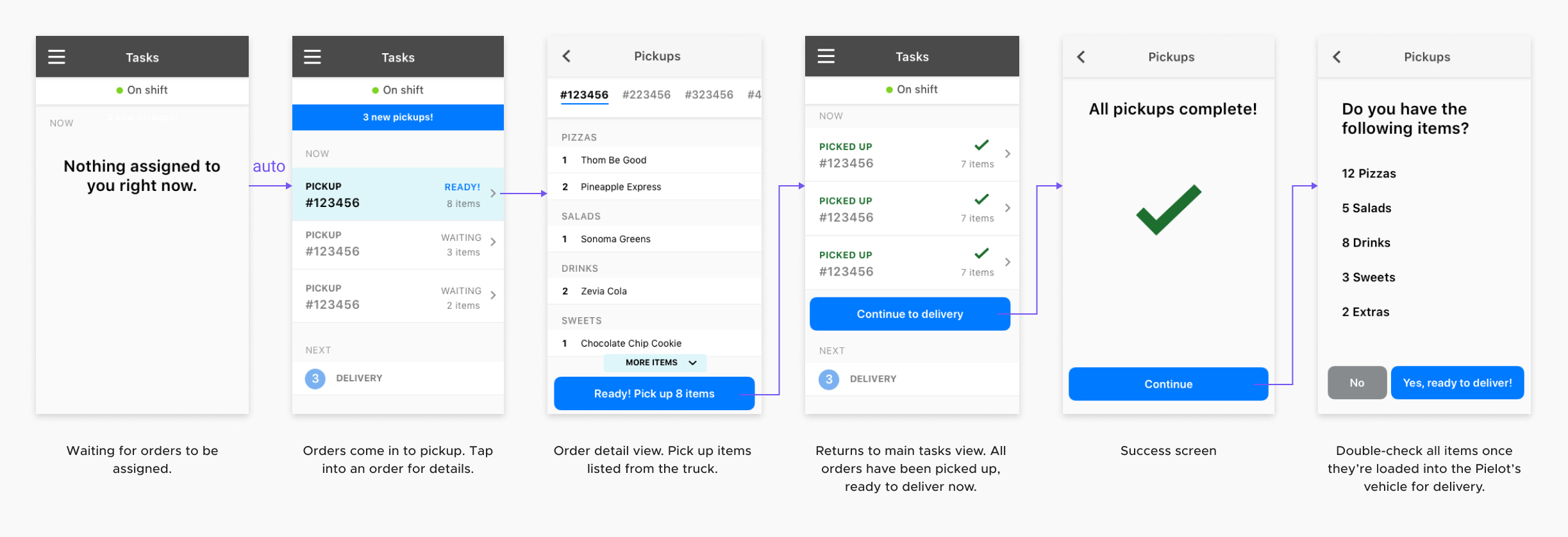
EARLY PROTOTYPE
One of the first prototypes we brought out into the field to test with Pielots. It was important to have our participants go through the process with real order items in actual delivery conditions.
Insights from testing
We went through 3 rounds of prototype testing. Each session included between 1 and 4 participants who currently worked or previously worked as a Pielot. We included participants with varying levels of experience to make sure the app would work for users with a variety of experience levels.
Confusion around the sequence of actions in the real world versus the app
“Are they waiting on me [to do something]?”
Throughout our testing, points in the flow would come up where users weren't sure of the action order that was expected of them. We resolved this issue by including additional messaging and visual cues at key stages in the workflow.
Pielots are already highly aware of customer & business expectations and don't need more perceived pressure
“I get it, but... 🙄 ”
In our second prototype, we included a "late by X minutes" marker on the order summary view to see if it might be a helpful addition. One tester reacted in a defeated way, explaining that they are hyper-aware of when orders are running late. It also became apparent in our conversation that Pielots are often scapegoated as the reason why an order is late.
The takeaway here was to remove any markers that add pressure to Pielots. It also influenced the language used throughout the app to be positive whenever possible, but still to the point.
Pielots thought of the delivery journey in 3 specific parts: pickup, navigation, and handoff
“Wait, why is it giving me another checkmark?”
We originally included many more success notifications at different points within the item pickup process, which consisted of picking up individual orders followed by a final check that all items were included in the Pielot's delivery vehicle. Our testers found this confusing, so we switched to 3 main notifications to mark the transition points in the Pielot journey that matched how Pielots thought about their workflow.
By the end of our iteration, multiple testers remarked on how simple the prototype felt. One tester even said the new version felt easier to use than the iPad flow they normally use on shift!
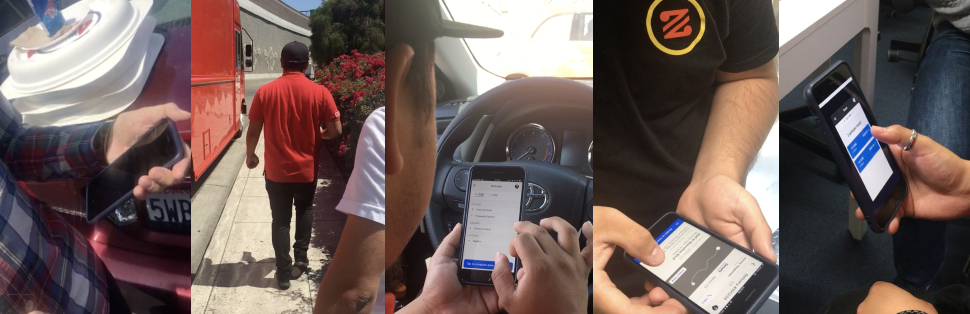
TESTING IN THE FIELD
We tested our prototypes in the field with mocked up orders as often as we could. We asked current Pielots, Captains, and Operations employees to test with us.
DESIGN SYSTEM
Baking in accessibility for drivers and speed for ourselves
We created a design system in Figma to make sure our designs were easy for engineers to implement quickly and easily. This also would make it easy to copy and modify for future Zume partners. The elements were mapped to tokens that we discussed with our engineers. We used the safety and accessibility principles that we researched to guide our visual design decisions.
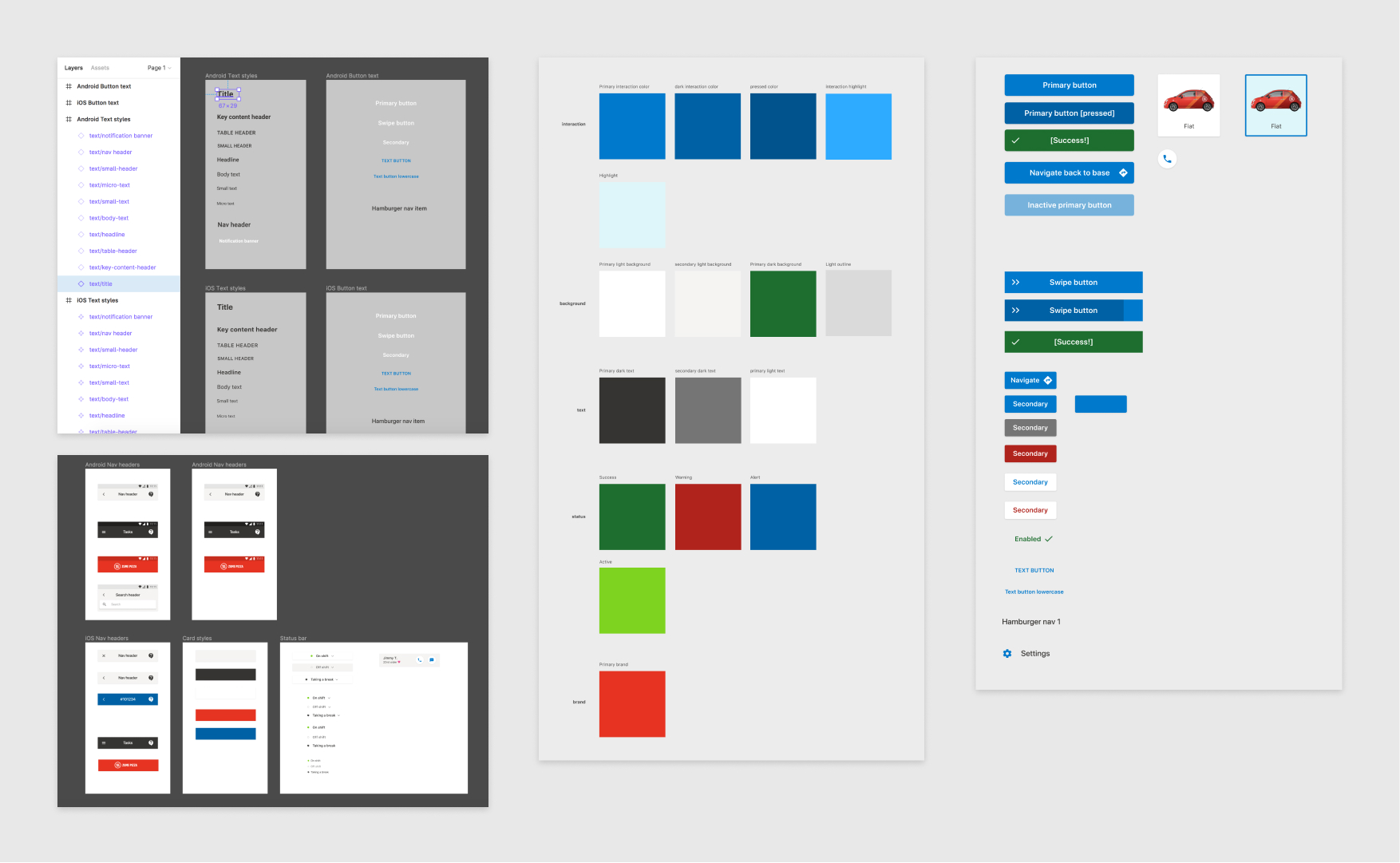
OUR FINAL DESIGN SYSTEM
Some artboards from the design system built for the Pielot app. The system was meant to be duplicated so we could easily edit it for new Zume partners wanting to run their own delivery-only restaurant.
FINAL DESIGN
Deliverables
Our final deliverables included a Figma prototype of the final app, a design system file, and animations for the notifications that I made with Flinto.
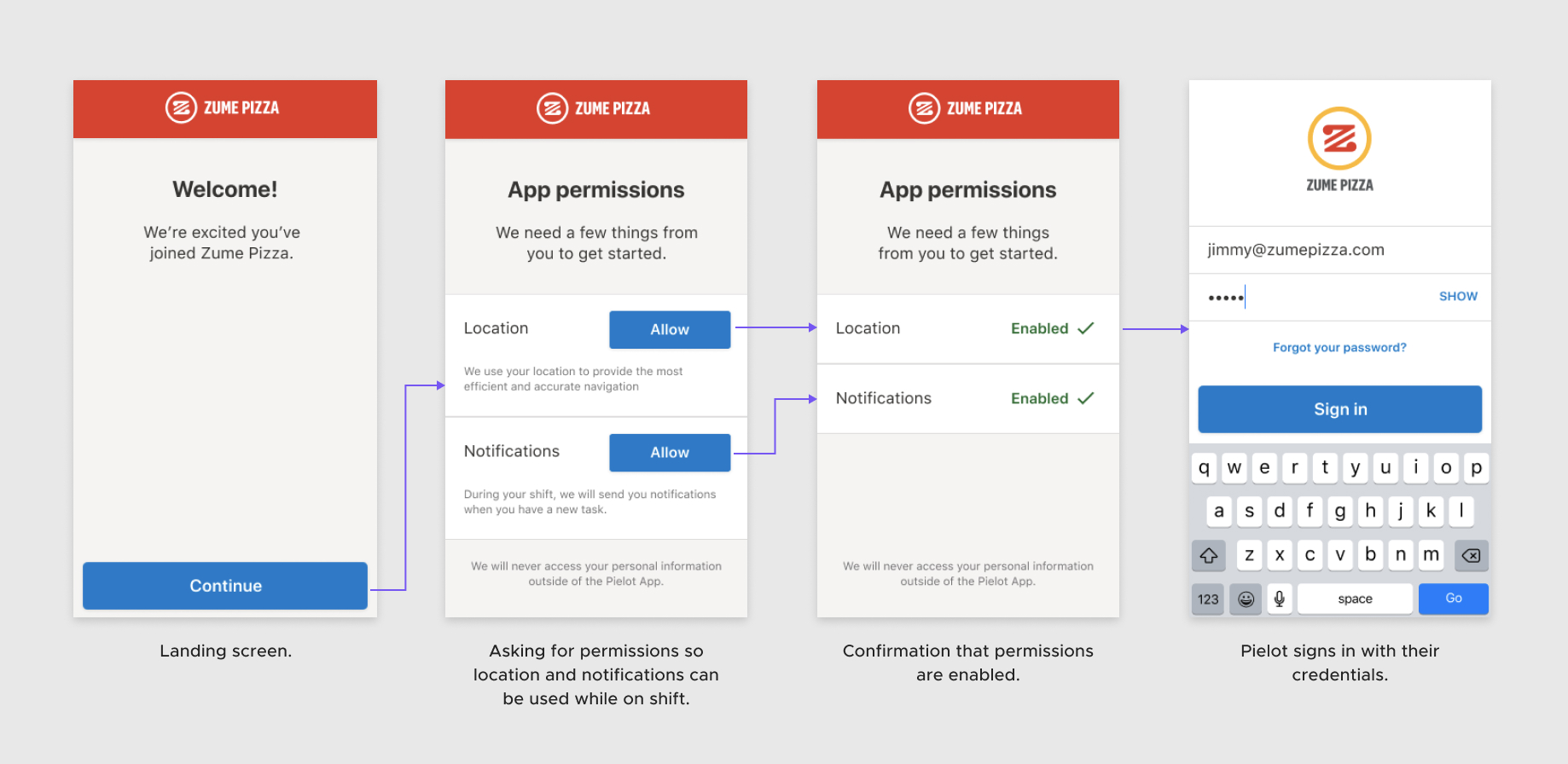
Onboarding
The onboarding flow guides drivers through enabling permissions needed to make sure they receive important notifications during delivery and for location information during work.
Delivery workflow
The delivery workflow is where drivers spend the majority of their time in the app. It guides them through the pickup, driving, and dropoff workflow steps as they make deliveries (click to zoom).

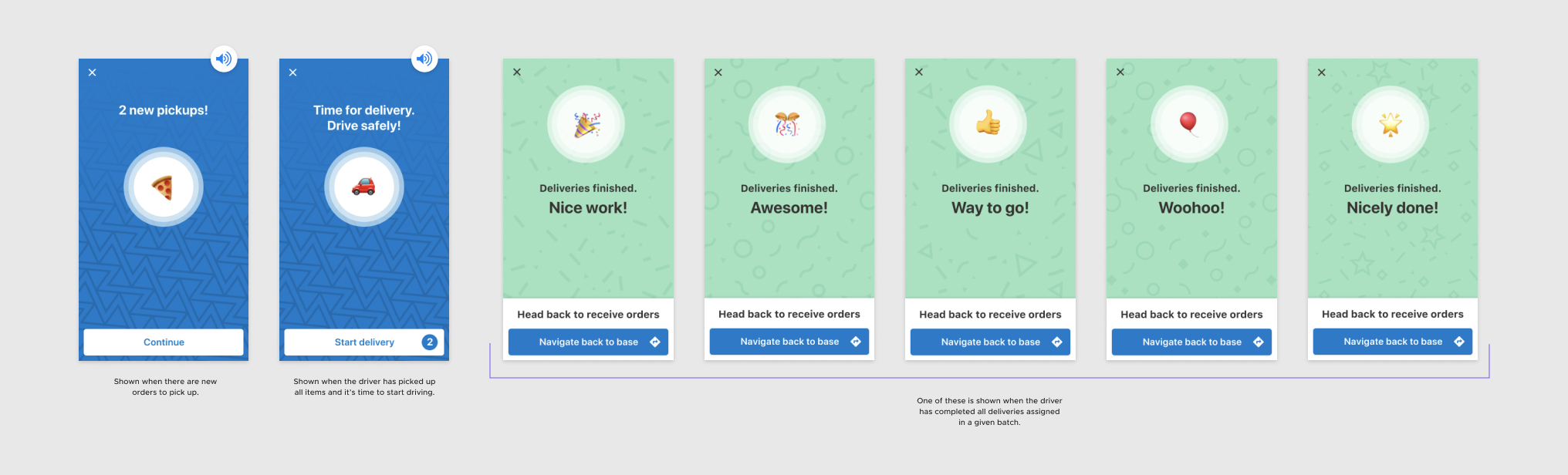
Notifications within the workflow
Different points of the workflow are marked by full-screen notifications. To break up what can be monotonous work, I made a set of success screens which were randomly generated at the end of a batch of deliveries. To make sure the themes could apply to a variety of different Zume partners while still maintaining visual interest, I used emojis in the icons. I also ran different sets of designs by our drivers to make sure the designs felt fitting and relevant to them.
CONCLUSION
Outcomes
- A delivery tool format that cut scaling costs since drivers could access the tool from their own mobile device
- Safety and accessibility considerations incorporated into the tool’s visual and interaction design
- Flexible design system that allowed for easy replication and editing for future Zume customers
- Documentation on designing for Pielots and drivers to guide decision-making in the future
What I learned
This project re-enforced the importance of testing in context. A small screen in direct sunlight during lunch hours had us using high contrast colors and larger point sizes. Testing this way also helped us understand how we could improve our Pielot’s understanding of action in the app and the world.
Constant collaboration gives better results. This was one of the first projects where my design teammate and I got to spend quality working time with our product manager outside of critiques and deadline checkpoints. This smoothed over the entire process and helped us deliver. It also taught me how to set expectations in a PM-designer relationship moving forward.
What I would add
Exploration of hands-free options. Pielots have their hands full often, in situations that require their full attention (e.g. crossing the street, stepping off a truck with pizzas, talking to a customer). Although the move from an iPad to a smaller device is easier to handle, I see a bigger problem to solve here of making the delivery tool fit more seamlessly into the workflow. I’d like to look into hands-free options like voice commands that make it even easier and safer for Pielots to update their delivery status.
Dark Mode. Unfortunately, we weren’t able to prioritize a dark mode for this version. Since many deliveries happen in the evening, it makes a lot of sense in this context as a basic feature.
Changes around delivery data capture. Through interviewing Captains, we found there were multiple instances where delivery data captures could be improved in the system. For example, the “Pielot on route” timestamp is collected when the Pielot confirms that items are all picked up. A more accurate timestamp could be collected when the Pielot presses “Navigate”, or when movement is detected. Changes like these would provide more accurate order information to the business and give the possibility for more accurate order ETAs.
Dark Mode. Unfortunately, we weren't able to prioritize a dark mode for this version. Since many deliveries happen in the evening, it makes a lot of sense in this context as a basic feature.
Changes around delivery data capture. Through interviewing Captains, we found there were multiple instances where delivery data captures could be improved. For example, the “Pielot on route” timestamp is collected when the Pielot confirms that items are all picked up. A more accurate timestamp could be collected when the Pielot presses “Navigate”, or when movement is detected. Changes like these would provide more accurate order information to the business and give the possibility for more accurate order ETAs.
Exploration of hands-free options. Pielots have their hands full often, in situations that require their full attention (e.g. crossing the street, stepping off a truck with pizzas, talking to a customer). Although the move from an iPad to a smaller device is easier to handle, I’d like to look into options like voice commands that make it easier and safer for Pielots to update their delivery status.